
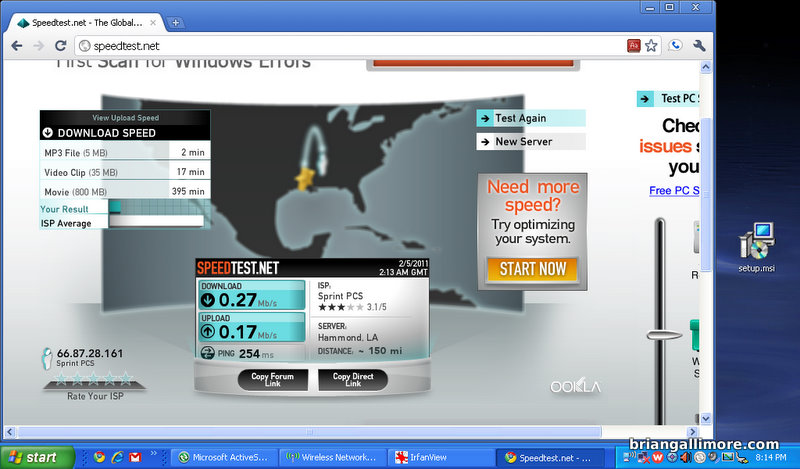
I finally decided I’d had my clunky old windows phone (with no data service) long enough. I decided to ditch AT&T and move to Virgin Mobile. I don’t like the way AT&T structures their data plans, and they are generally overpriced, over-restrictive, and nickel-and-dime happy on everything. Virgin Mobile uses the Sprint network, which is CDMA instead of GSM. I don’t have a contract, lowered my monthly bill, and added 2 unlimited data plans and 2 unlimited text messaging plans. It is hard to say no to a deal that good. I’m not sure how I like the network yet, as I’ve only used it in our house, and it is at least as good as AT&T was here in the house.
We bought the LG Optimus V phones (Optimus One P500/VM670) for a reasonable price. I was not going to pay over $200 for a phone! According to wikipedia:
The LG VM670 was released as the LG Optimus V for Virgin Mobile on February 1, 2011.[2] This variant ships with a version of Android 2.2 that is the closest to “stock” of all Optimus One variants. Mobile hotspot functionality is missing from the phone’s settings pages; however, it can be enabled by the user at any time.[3] The phone is very similar to the Optimus S.
“Closest to stock” is a very good thing when you are talking about open source software. The carriers dink around with things and make them slower and limit their functionality. Without ‘rooting’ the phone, I was able to configure it as a VoIP/SIP client and Wi-Fi router (hotspot) using only free apps from their app store.
The phone is made to integrate with google services like mail, calender, chat, voice, picassa, maps, and reader. I couldn’t be more happy with how easy it was to setup and how well it works. (I use and love all the google stuff) Even my complicated google calender with multiple different calenders in different colors shows up correctly without me having to do anything except give it my google username and password. The market place (app store) is amazing. It is maintained and controlled like the Ubuntu repository with the added benefit of lots and lots of capitalist trying to make a buck by adding in their contributions. It is crazy how much stuff is out there, waiting to be installed with a button press. (I’m listening to the Collin county sheriff, fire, and EMS through a scanner app right now)


I’d had that phone for 3 years, and never was really happy with it! http://blog.briangallimore.com/2008/01/entry-for-january-08-2008-death-of-my-favorite-phone/
Can you translate this, please. The combination of poor grammar and my unfamiliarness with the terminology makes it impossible for me to decipher the statement. I know you didn’t write it, but you may have a better chance than I do.
Forgot the most important part, the jumbled mess of words:
In this guide, I’m going to show you how to tether your LG Optimus S to computer. If your LG Optimus S without rooting and using the one that comes built in from being froyo without using a carrier, You are lucky. Your LG Optimus S will do it.
rooting = doing something to the phone via the ‘root’ user that will alter its out-of-the-box functionality. Usually this means using a custom kernel, and by custom, I mean a standard Linux kernel instead of the carrier-specific kernel that has some functionality limitation. An update from the carrier will usually wipe out these things, so you have to maintain it yourself.
froyo = Android 2.2 (Linux loves to use goofy names for OS versions)
‘the one that comes from the carrier’ = the carrier-specific Linux kernel
If your LG Optimus S without rooting and using the one that comes built in from being froyo without using a carrier, You are lucky.
That’s some engrish for you.
tell me about it. The mobile phone forums are very busy and full of idiots from around the world. It makes trying to figure something out pretty painful.
A few notes after using it for a while:
dislikes
1- battery life sucks. it won’t make it through a day without sitting on the charger
2- the low-end processor is not supported by the latest versions of Adobe flash, so some websites don’t display correctly. I think I hate Adobe as much as I hate Apple and Sony.
3- no lights, so you don’t know when it is charging unless you turn on the screen – minor issue
4- voicemail indicator stays on sometimes, not sure if this is the phone’s fault or Virgin Mobile’s fault
5- screen is hard to read in sunlight
likes:
everything else, love all the functionality, applications, etc